SEO Guide for Your E-commerce Store

Geir Halvorsen
Senior SEO-specialist
Today, e-commerce is a prominent and highly competitive part of retail, where it's crucial to stand out and be visible among the multitude of sites. For online retailers, SEO is therefore not just an option but a necessity. Investing time and resources in an effective SEO strategy can make the difference between being lost in the digital noise and becoming a prominent player in the market.
Why work with SEO?
SEO is about optimising your site to increase its visibility in search engine results, which has a direct impact on the number of visitors and potential customers who find their way to your store. By working with SEO, you open the door to a world of possibilities where your e-commerce can rank higher, attract targeted traffic and increase conversions.
The increased visibility that comes with a strong SEO strategy leads not only to more traffic but also to greater credibility and trust among potential customers. When your website ranks high in the search results, it signals to users that your business is authoritative and relevant within your niche.
What do you need to keep track of?
If you have these four areas under control, you can get quite far:
- Keywords
- Content
- Technology
- Links
Keywords as the cornerstone
Keywords form the backbone of SEO and act as keys to unlock the doors to online success. In a digital world where the customer's first step is often via a search engine, accuracy in choosing and optimising relevant keywords becomes decisive. By keeping track of the words your potential customers search for, you can target your texts to reach purchase-ready customers. The vital role of the keyword extends beyond merely attracting traffic; it becomes a strategy for turning searches into conversions and thereby creating a stable foundation for successful e-commerce.
Keyword research – a short guide
Carrying out effective keyword research is a fundamental and important part of SEO and digital marketing. It helps you understand how people search for information about your products online, which in turn gives you the chance to adapt your content to their needs. In this guide, we'll look at four main areas within keyword research: keywords you already rank for, search intent, competitor analysis and keyword mapping.
1. Current ranking – find out which keywords your e-commerce ranks for today
Before you build your keyword strategy, it's a good idea to find out which keywords you already rank for. That way, you can start working on content on your site that already ranks well, or fairly well.
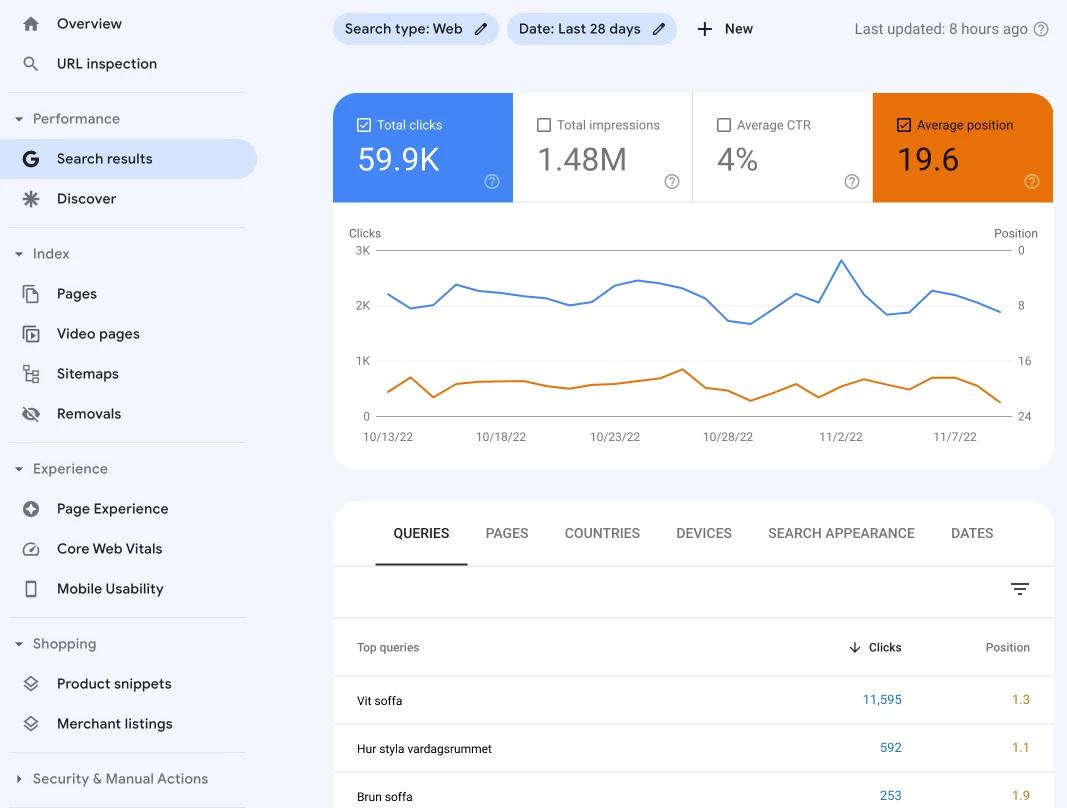
To see how your site ranks, you can use paid tools such as Ahrefs and SEMrush, or you can connect your site to Google Search Console, a free tool from Google. Here you can see which keywords you rank for, as well as how much traffic you get from Google's organic search results (plus much more).
2. Search intent – understand why people search
Search intent refers to the purpose behind a search. To optimise your content, you need to understand why people search for specific words or phrases. There are usually four main types of search intent:
- Informational searches, where the searcher is looking for the answer to a specific question or wants to learn more about a particular topic
- Navigational searches, where the searcher is looking for a website, a page online or a geographic location
- Commercial searches, where the searcher is researching or comparing brands, products or services
- Transactional searches, where the searcher intends to make a purchase or carry out an action on a website
To identify search intent, you can use tools like Google Trends, Google Suggest, or carry out searches yourself to see what kind of results are generated.
3. Competitor analysis and GAP analysis – learn from others in your industry
Analysing your competitors' keyword strategies provides valuable insight and helps you identify opportunities and gaps. Here are a few steps you can take:
- Identify your competitors: Define which companies or sites compete with you for the same audience.
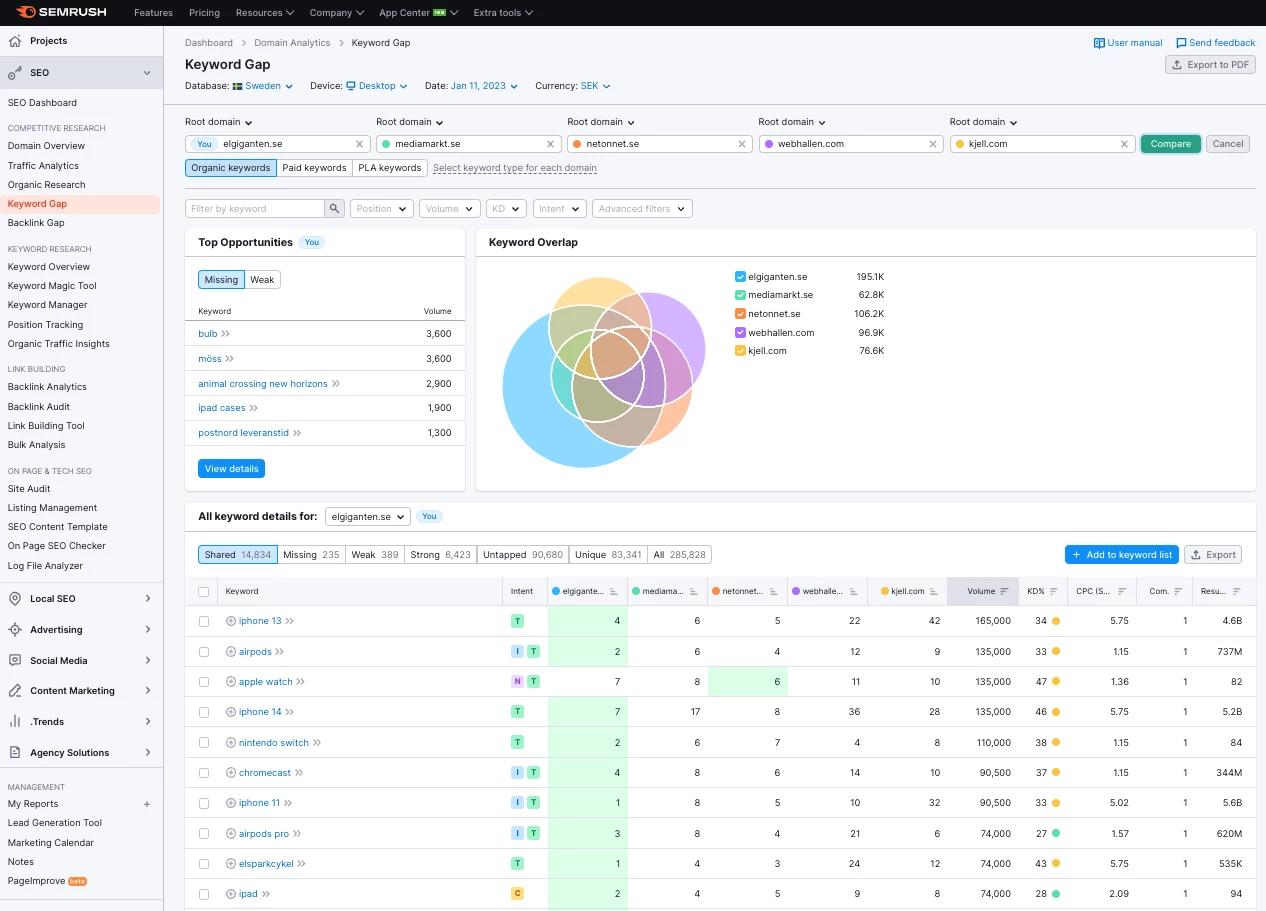
- Analyse their keyword strategy: Use tools like SEMrush, Ahrefs or Google Keyword Planner to identify which keywords your competitors focus on. Find keywords you're missing.
- Assess their content: Look at the quality and type of content they publish. What do they offer that you can improve on or complement?
4. Keyword mapping – organise and optimise your content
Keyword mapping means organising your keywords based on their relevance to different parts of your website. Here are some steps for carrying out effective keyword mapping:
- Create a list of relevant keywords: Based on your keyword research, create a list of keywords relevant to your business.
- Group the keywords: Organise the keywords into groups based on similar themes or topics.
- Assign the keywords to specific pages, categories or products: Assign each keyword or group of keywords to a specific page or blog post on your website.
- Optimise the content: Write your content with a focus on the assigned keywords, and make sure it's user-friendly and relevant.
By carrying out thorough keyword research, understanding search intent, analysing competitors and creating a keyword map, you can increase the chances of your website being seen and ranking high in the search results. Continuously monitoring and adjusting your keyword strategy is important for staying competitive and relevant in the digital world.
Text content
Now that you have a better grasp of your keywords, it's important to start reviewing the content on your site. When you write texts for both categories and products, it's important to use common sense: what is it you want to present? What do your customers need to know about your product? It's probably the same things a search robot needs to know.
Google's recommendations
Google has many recommendations when it comes to keyword optimisation, but there are two that are an especially good fit when writing texts for your site.
- Write for people, not search robots.
- Create content that clearly and simply describes what you want to communicate.
Product texts
Now that you've done keyword research, you probably know what your customers search for when they're looking for your products, so make sure to use those keywords when you write your product texts. Create good, explanatory and descriptive text content about the product. Put a little extra effort into making the content easy to take in, for example by breaking up longer texts with explanatory subheadings, creating bullet lists that describe the product, or making it easier to see the product's benefits. Google appreciates anything that improves usability. Make sure your content is unique and not, for example, copied from a supplier's website. Copied content lowers Google's impression of your website and can affect your ranking negatively.
Clear title and meta description
Make sure the product's or page's title and meta description are clear and descriptive of the page's content. A title should be both compelling and descriptive in order to spark a reaction in the searcher. Be careful to include important keywords in the title, and try to make the text unique. You always want to try to create a search result that stands out a little from the crowd, in order to increase clicks compared with your competitors.
An example of a good, clear title and meta description:
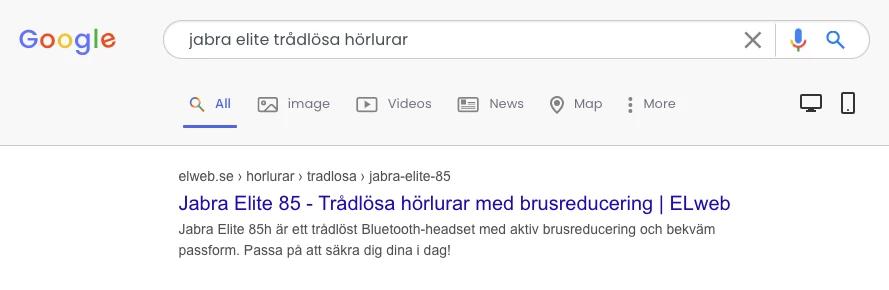
Here, the product's name appears at the start of the title and is combined with a description of what the product is and what function it has, ending with the name of the company behind it. The description explains more clearly what the product is, together with a few USPs (unique selling points). The description ends with a call to action that encourages a purchase. This title is relevant for several different searches, such as the product's name "Jabra Elite 85", or the product's function "wireless headphones" and "noise-cancelling headphones".
There are free tools online that help you craft a good title and meta description. Here you can see immediately whether you're staying within Google's limits for how long a text can be, and you can also see how the search result will look.
Category texts
When it comes to category texts, the same recommendations apply: write for people, be clear and keep it simple. But here the challenge is that you have to describe several products, so the text can end up a little scattered.
A basic rule to remember is to try to describe the content of the category so that someone who hasn't even seen the content can understand what to expect. There are no rules for how long or short the text should be, but think usability first. An easy-to-read text with clear subheadings, and perhaps a bullet list too, is preferable.
Category titles and meta descriptions
For categories too, a clear title and meta description are very important. Think of a well-written title and meta description as your potential customers' first impression of your company when they see it in Google's search results.
For a category, the title needs to be a little broader, so not as descriptive and detailed as for a product. I usually create titles that contain the most important keyword, clearly describe the content, and combine that with a CTA, USP or some positive text. Example:
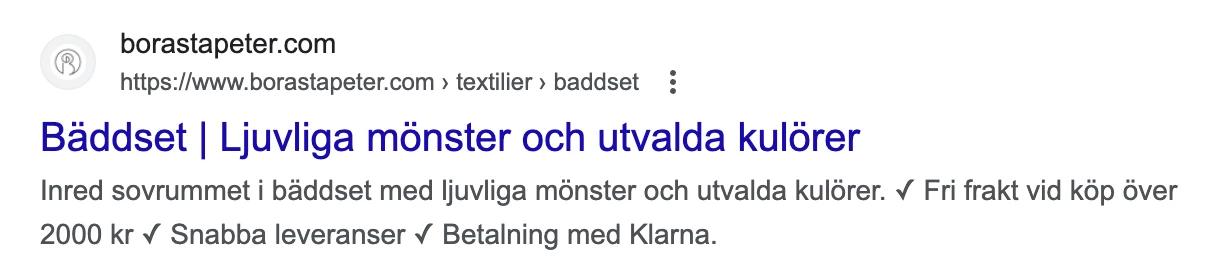
Here I open with a keyword and combine it with a description of what to expect on the page. In the description, I combine a descriptive line of text with selected USPs.
If you're going to write titles and descriptions for many categories, I recommend using your keyword-mapping document. Create columns for titles and descriptions and use, for example, USPs or CTAs that you can easily copy and paste into the descriptions, as I've done above. Remember, though, to keep around half of the description unique.
Duplicate content
Having duplicate content on your e-commerce site can drag down the site's rating. This applies both to text copied from other sites, for example from a supplier, and internally on the site where several pages share the same content. Always aim to have content that's as unique as possible on every page.
Google doesn't penalise duplicate content
Google has previously stated that it never penalises a site for having duplicate content. So it isn't "illegal" and you don't get a penalty. However, you do make it harder for Google, and other search engines, to assess which page or which site is most important for that particular search, which can result in the very page you want to rank unfortunately not doing so.
If you have a product with several variants, for example, it's quite natural for these to have fairly similar texts. Let's say you sell thermos flasks, where one of them comes in five variants that differ only in colour. Here the specifications for all five products will be identical, and there's nothing wrong with that. What you can take the opportunity to work on is the content that describes what actually sets them apart. The titles, for example, should start with what distinguishes them:
- Red thermos bottle, 0.75L, Stanley | Naturbutiken.se
- Blue thermos bottle, 0.75L, Stanley | Naturbutiken.se
The intro, that is, the short opening text about the flasks, should also be unique, but the rest of the content, such as the longer description, specifications and so on, can then be the same. A rule of thumb is to try to keep at least 25–30% of the content on the variants unique.
Strengthen your brand – build authority
One factor that plays a big role for your whole site's ranking is how strong your brand is and how authoritative you are within your industry. There are loads of different ways to build and strengthen your brand, but one that's good when it comes to SEO and organic search is to create articles that answer questions. We're talking here about helpful articles that solve problems and answer the searcher's question.
How do I know which questions are being asked?
If you search for one of your products, there's a good chance suggested questions will appear in the search results if you scroll down a little. Example:
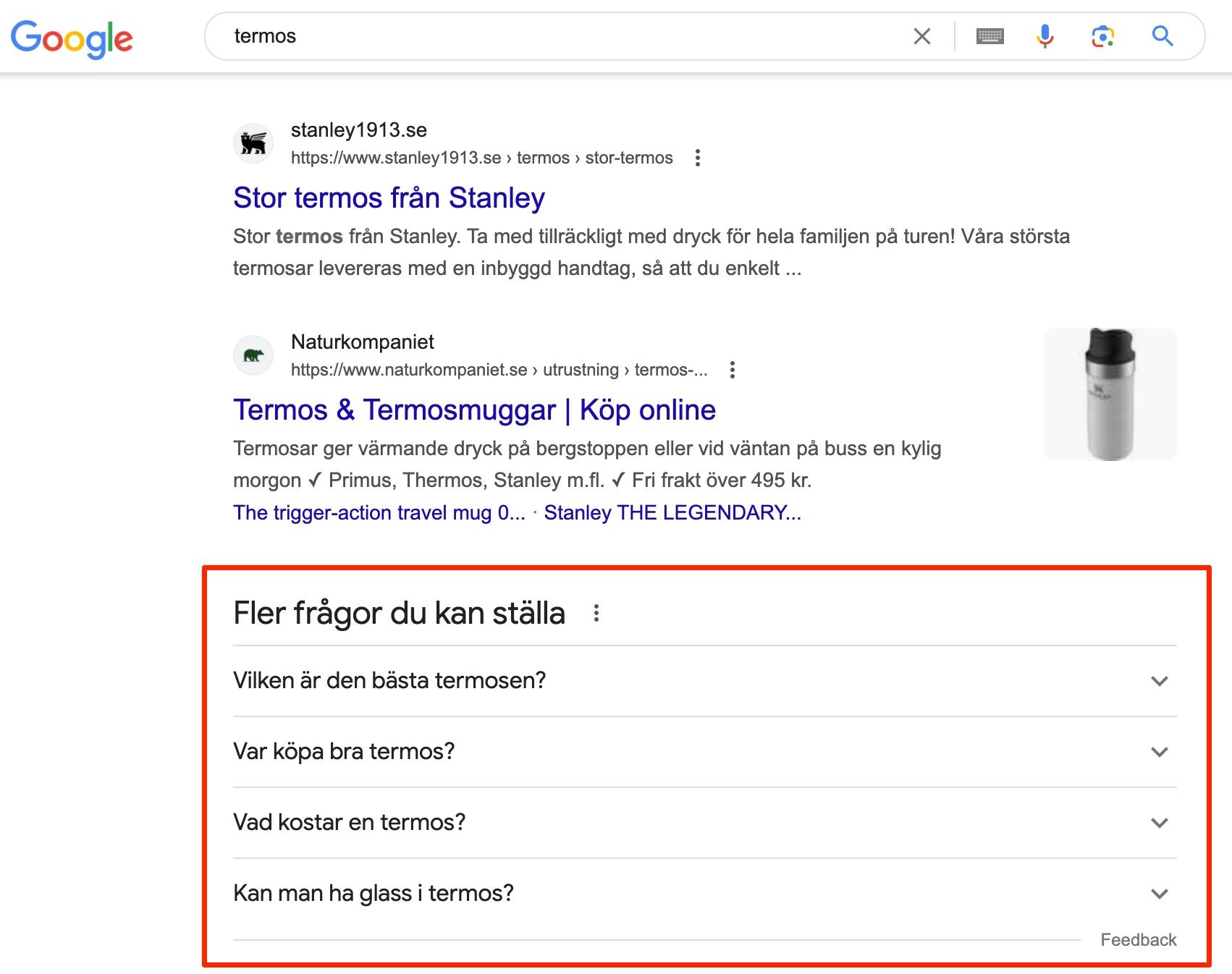
There are various ways to answer questions. You can create a blog, a news section, or perhaps a "help centre" that publishes guides and helpful articles relevant to your products.
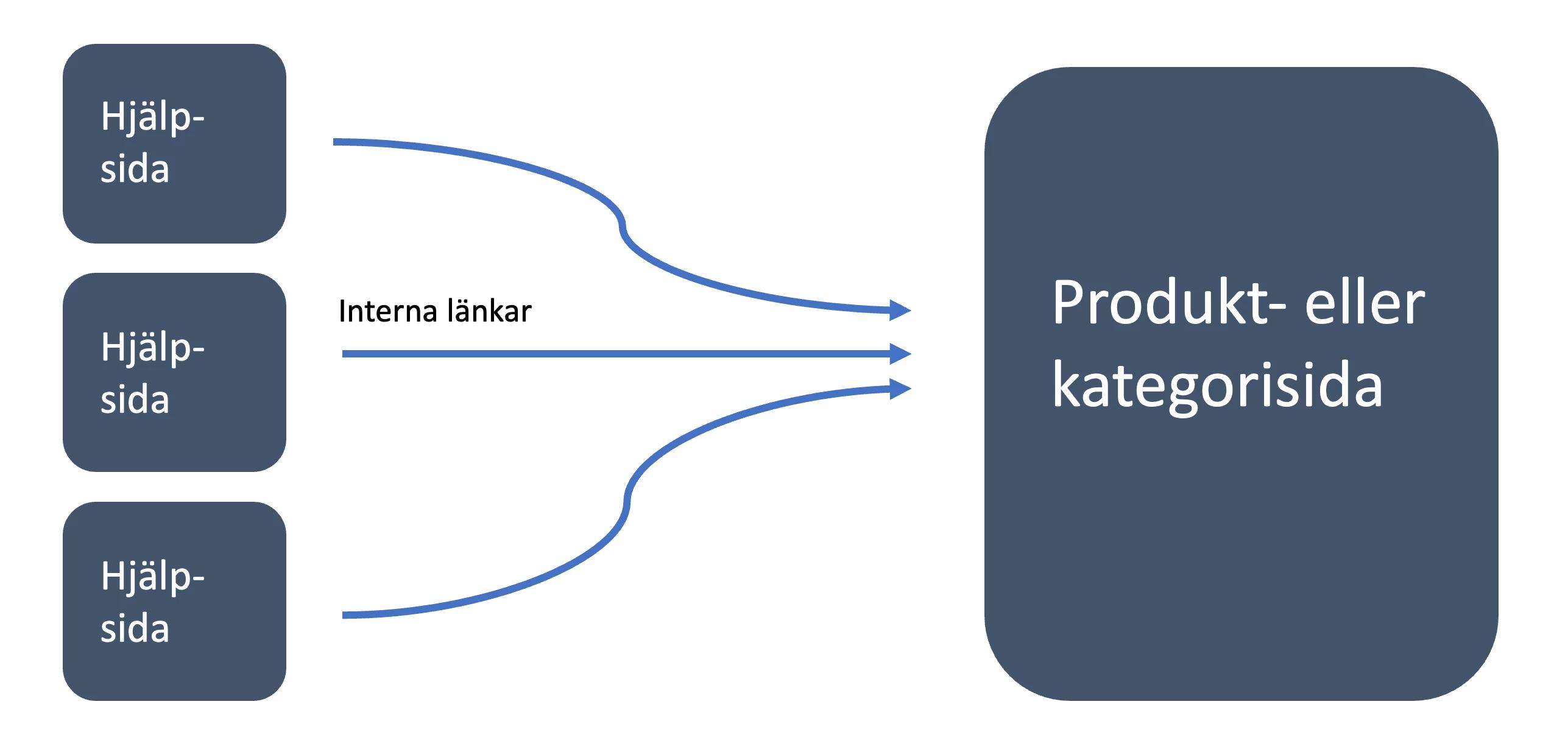
It's important that the focus and message of these pages is on helping and answering, not selling. The goal of the pages is to create content that answers and guides, content that also gets shared voluntarily online and perhaps, ultimately, even earns a link or two. From these pages, though, we want to make sure there are internal links to the products you sell that are relevant to the articles.
By linking internally to products relevant to the questions, you increase the importance of the product. The helpful pages strengthen your brand and build authority, while the internal links help your products' ranking.
Technical SEO for e-commerce
Making sure the technology on your e-commerce site works is a very important part of SEO work. When we talk about technical SEO, the emphasis is usually on the following points:
- Loading times and performance
- Structured data
- Sitemap
- URL structure and the site's hierarchy
- Broken links
- Redirects
- Image optimisation
Loading times and performance
If your pages load slowly and performance feels sluggish, this will affect both your ranking and your conversion rate. Your visitors will most likely drop off and surf to a competitor if the page takes more than 3–4 seconds to load.
Vad påverkar laddningstider?
Oftast är det de samma faktorer som går igen när det kommer till laddningstider. Några av de största bovarna brukar vara stora tunga bilder, trög responstid från server eller tung kod och onödiga script.
What affects loading times?
It's usually the same factors that recur when it comes to loading times. Some of the biggest culprits tend to be large, heavy images, slow server response times, or heavy code and unnecessary scripts.
Analysis and solution
To find out what's affecting your site's performance, I recommend running the PageSpeed Insights tool, which is free. Enter the URL you want to check (the tool only checks the specific URL you've entered, not the whole website at once) and take in the diagnostics you get. There's quite a lot to look at here, and you can get concrete suggestions for the measures you should take.
It's important to prioritise and try to fix one problem at a time; it's hard to solve everything at once. Once you've solved one problem, you can run the test again and see what results you get then. It's also important to remember that the data you get from this tool is a pointer to how your website is doing. Not every number has to be green, but it's good to always have goals to work towards.
Structured data
Structured data is important for e-commerce for several reasons, but the four most important are:
- Structured data makes it easier for search engines to index and understand the content on your site. By using structured data, such as schema.org microdata or JSON-LD, you can optimise your product pages for search engines and thereby improve your chances of appearing higher in the search results.
- E-commerce sites often contain extensive product information, including attributes such as price, size, colour, stock status and much more. By using structured data, this information can easily be categorised and interpreted by both humans and machines, which makes it easier for customers to find and compare products.
- By using structured data, your e-commerce can improve its appearance on search results pages by showing so-called rich snippets. These can include extra information such as reviews, prices and availability directly in the search result, which makes it more tempting for potential customers to click the link.
- Structured data also makes things easier for automated processes and integrations between different systems. It can be used to create smooth handling of product data, order management, inventory management and other aspects of the e-commerce business.
Check your structured data
If you run an e-commerce site, it's important to keep track of your structured data and get it verified. I recommend testing your site with one of these tools:
- Google Search Console (has its own section for this)
- Google's structured data tools
XML sitemap
An e-commerce site usually consists of a great many pages. To make things easier for search robots when they navigate around your site, we want to give them a map, and this is where an XML sitemap comes in. An XML sitemap is an XML document consisting of all your site's URLs (you can leave out pages that shouldn't be indexed or shown) and works almost like internal links. Note that I say "almost"; the URLs in a sitemap don't carry the same power as actual working links on your site. As I said at the start, this works more like a map for search robots and simply makes indexing your site easier.
Does your e-commerce have an XML sitemap?
This is quite easy to check, as it's usually located at the address domain.se/sitemap.xml. If you don't find anything at that address, you can check whether there's a link in your robots.txt file. Go to domain.se/robots.txt. If you don't have an XML sitemap, I recommend trying to create one. On Google Search Central you'll find more info about sitemaps and the rules around them.
URL structure and hierarchy
If you have a good URL structure, it should be easy to read and understand. Ideally, you should be able to follow the website's hierarchy, and it should preferably contain a few keywords. In other words, it should be easy to understand what to expect on the page before clicking the link. An example of a good URL structure is borastapeter.com/wallpaper/rooms/childrens-room/. Here we understand immediately what to expect on the page, and we can see that the URL is optimised for "wallpaper children's room". Always try to avoid cryptic URLs such as tapetbutiken.se/catalog/products/id-sl-7754, where neither search robots nor humans can decipher the content.
Image optimisation
As mentioned earlier, your site's performance can be negatively affected if you have heavy images on your pages. When we optimise images, there are usually two things we're talking about:
- Text optimisation of images with ALT text for Google's image search
- Compression of images for faster loading times
Depending a little on which industry you're in, image search is often a fairly important part. Let's say you sell furniture, for example; in this industry it's very common for customers to look for inspiration before making a purchase. These can be search phrases such as "Green sofa in living room" or "Country-style kitchen", and so on. Since search robots can't read the content of an image, complementary text for this is important. ALT text gives search robots information about what's in the image. If you've optimised your images correctly, you increase the chance of your products appearing in image search.
It can feel daunting to have to optimise all the text on a great many images, but a rule of thumb is to keep it simple. When you upload an image into a CMS, you're usually given the chance to create a short, descriptive title for the image. Both the title and the ALT text are important. Example:
Here is an image of a bottle and a coffee cup.

- An entirely okay ALT text for this image could be
<img src="bottle_coffeecup.jpg" alt="bottle coffee cup"/> - A better ALT text, however, would be
<img src="bottle_coffeecup.jpg" alt="white water bottle and black coffee cup"/> - Some people try to cram in as many keywords as possible, but this should be avoided. The worst image optimisation is
<img src="image0085.jpg" alt="coffee cup cup with coffee coffee drink coffee coffee party fika fika with coffee coffee break"/>
Optimising image size for performance
To ensure fast loading times on your site, it's crucial to compress your images before uploading them. Many users lose interest if pages take too long to load. There are various methods for image compression, and while Adobe Photoshop is a common choice, there are also online services such as tinyjpg.com. Aim to keep image weight at around 100 kB for optimal performance.
When it comes to file formats, JPEG and PNG are the most widely used options. Google, however, recommends using WebP or AVIF where possible. While most browsers support AVIF, the same can't be said of WebP. It's therefore important to have a fallback solution for visitors whose browsers don't support this format. CDN providers, which are often used for image serving, usually offer fallback mechanisms for such situations. For more information about WebP, see here: https://developers.google.com/speed/webp/faq
Are links important for SEO?
Links have always been a central part of SEO and are a way for search engines to understand how important a site is by assessing how many and how strong its links are. You could say that links help guide search robots around the web; they're the paths the robots use to find new pages on your site. If you have many links from other good, strong sites, that gives search engines signals that your site is important. So it's important to try to have a plan and work on getting new links to your site.

Broken links and redirects
A broken link is when a link from a page goes to a URL that no longer exists and returns a "404 not found" error code. This applies both to links from other sites and to internal links.
How do broken links affect your visibility?
Having many broken links internally on your site affects usability, since it creates frustration for your visitors when they land on a 404 page, but it also affects ranking, as it can lead to interruptions when search robots crawl your site. It signals to the search robots that the internal linking is poor and messy.
When it comes to external broken links, that is, links coming from other sites to your site, this affects ranking too. One way to raise your site's ranking is to get links from other sites; that way, you tell Google that your site is important and popular. When these links go to a 404 page, it sends the wrong signals and you lose what we call link power.
Check for broken links
To check whether your site contains broken links, you can either surf around your site and test all the links, but this is fairly time-consuming work. The easiest approach is if you can do a crawl of your site so that you get a complete overview of all the internal broken links. A tool that can help you with this is Screaming Frog. Some e-commerce platforms also have a checker built in for this.
To check external broken links, that is, links coming from external sites, there are tools for this too. Here you can use, for example, Google Search Console, or buy a licence for tools like Ahrefs. The latter is the one I personally prefer.
Fix broken links
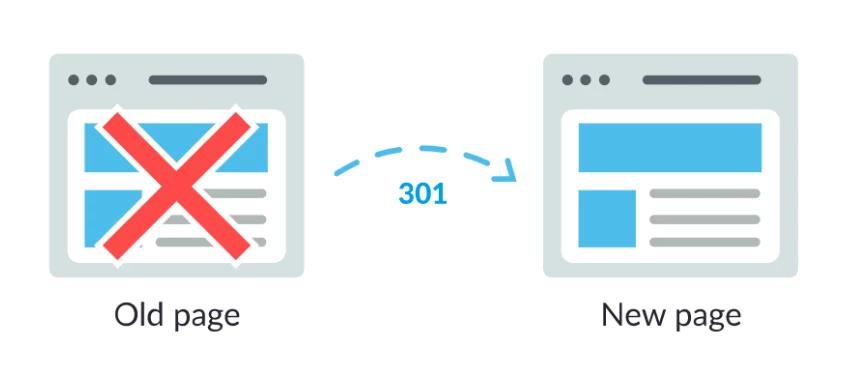
Once you have an overview of all the broken links, they need to be fixed. For internal links, the best thing is to actually change the link in question and make sure it goes to a working address. If you have a great many internal links that are broken, it can be easier to just add 301 permanent redirects from the old addresses to the new ones, since you can probably redirect several links at a time.
For links coming from external sites, only 301 redirects can be used (since you can't change the actual link sitting on an external site here). That way, you can rescue lost link power.
How do you get new links to your site? Here are a few examples:
- Talk to your partners and loyal customers who like your brand and ask outright whether they'd consider linking to your site. You can also offer to link back; you'll often get a positive response.
- Create shareable content. This could be, for example, a blog or informative pages that can be of use and help to someone. If the content is good, this can result in the visitor choosing to link to it from their blog, on Twitter, and so on.
- Create content with news value and earn attention from the press, bloggers or other media. Sometimes it can be as simple as giving something away for free, launching a really great new product, or publishing something controversial.
- If you write a press release, take the opportunity to ask for a link from the article to your site if the article is published.
Summary
- Get a handle on your keywords
- Write for people
- Make sure product texts are descriptive of the product
- Optimise titles and meta descriptions
- Avoid duplicate content where possible
- Answer questions within your industry
- Keep track of your loading times
- Make sure your products have good structured data
- Make sure your site has an XML sitemap
- Aim for a good URL structure that follows the site's hierarchy
- Optimise your images
- Fix broken links
- Try to get new links
It can feel overwhelming to tackle all of this, but if you work systematically and take it part by part, you'll reach success. Whatever the challenge, try to make SEO part of your daily work; do set aside time to dedicate to reviewing items on your list and tick them off as they're done.
Feeling like it's too much?
If you're solely responsible for SEO at your company, it can be a relief to have a sounding board to turn to, or to get help with targeted efforts, strategies and analyses. We at Motillo Growth Team can help with assignments both small and large. In some cases we work on an ongoing hourly basis, helping with individual challenges and acting as a sounding board, while for other customers we take care of all their SEO.